|
ແຟນເວີດ · ເມກຊີໂນເອັດ ທີເອັມເອີ
5453-203
ແຜງສະແດງຜົນ / ສຳລັບຜູ້ປະຕິບັດງານ
|
ສຳເນົາເກົ່າ
ມີສິນຄ້າຢູ່ໃນສະຕັອກ
ຕົ້ນສະບັບໃໝ່
|
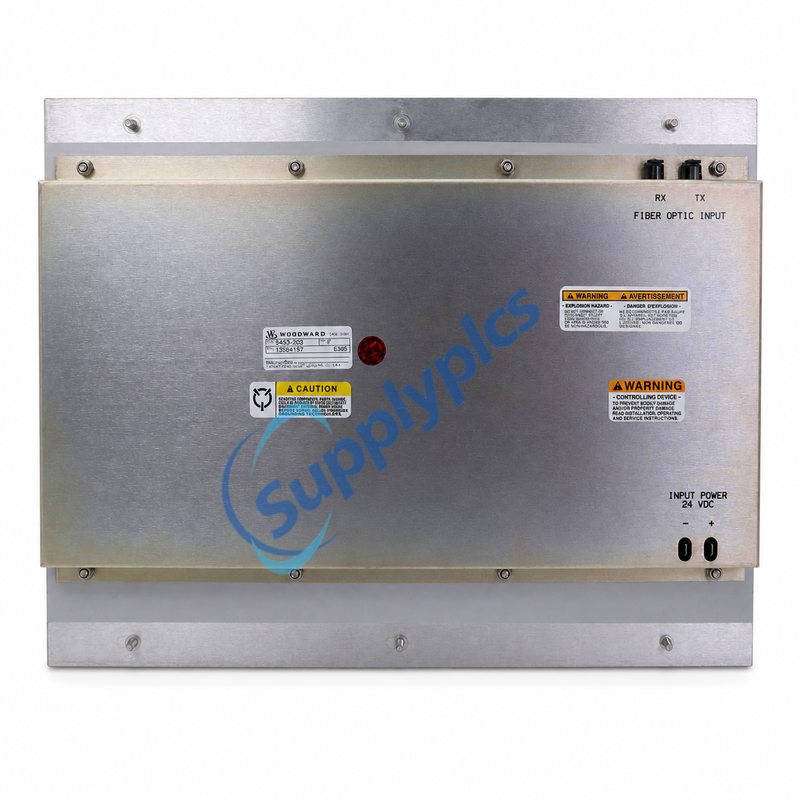
| ຄຳອະທິບາຍທາງການ: ແຜງ – ຈໍສະແດງ · ການເຊື່ອມຕໍ່ດ້ານຫຼັງ: ການປ້ອນຂໍ້ມູນໄຟເບີອິນທາເນັດ RX/TX ແລະ ແຮງດັນ 24 VDC · ການກວດສອບການສັ່ງຊື້: ຈັບຄູ່ເລກທີ່ເປັນເອກະລັກ P/N 5453-203 ແລະ ການຕັ້ງຄ່າລະບົບຫຼັກ | |
|
ຕິດຕໍ່
ອີເມວ: [email protected]
WhatsApp: +86 18159889985
|
|
| ສົ່ງອີເມວຖາມ ວີແຮັດ | |

|
ຮູບແບບທີ່ເນັ້ນ
5453-203
ການຕິດຕັ້ງແຜງສະແດງຂອງ Woodward ສຳລັບການຄວບຄຸມ MicroNet TMR ຮຸ່ນເກົ່າ.
|
ຫຍັງທີ່ອຸປະກອນນີ້ເປັນ
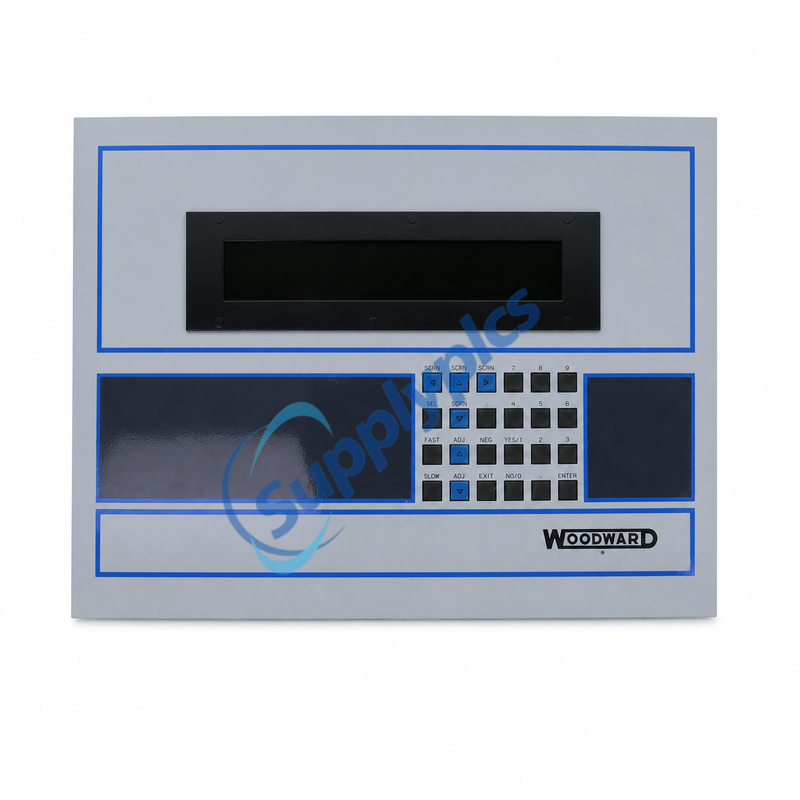
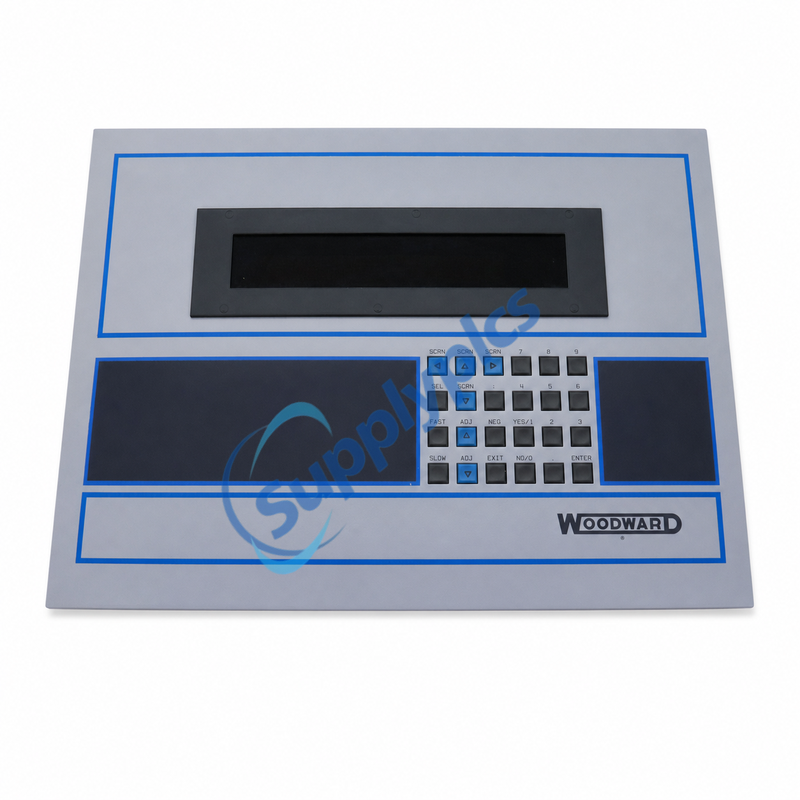
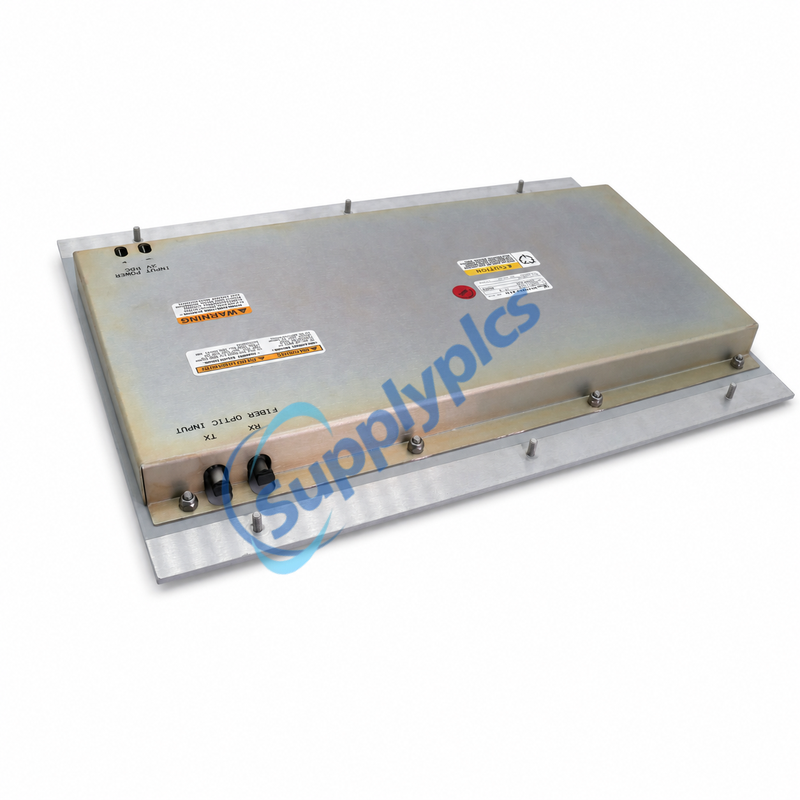
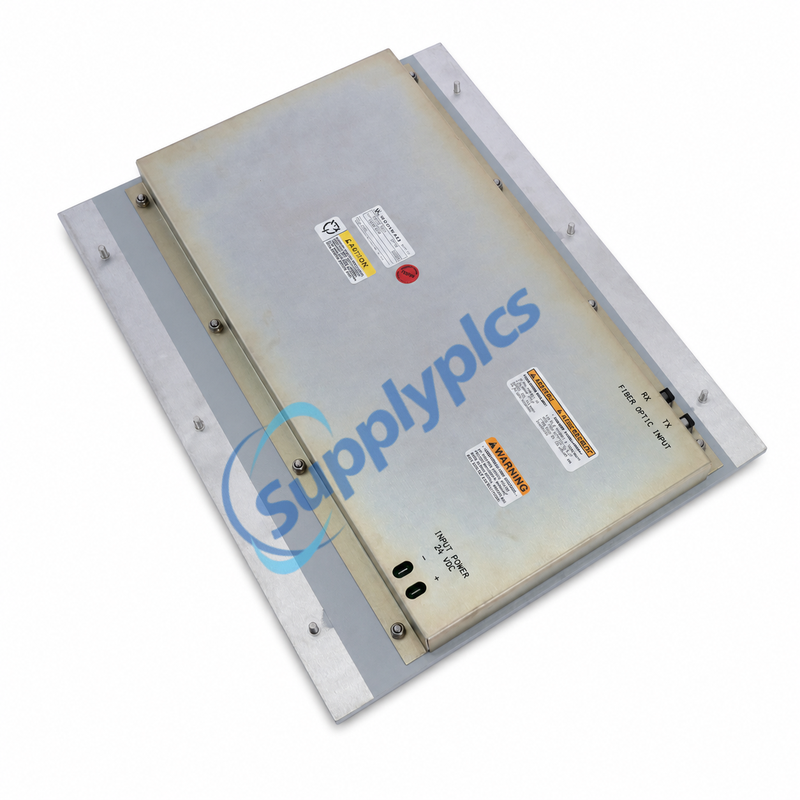
Woodward ກຳນົດເລກທີ່ຊິ້ນສ່ວນ 5453-203เป็น ແຜງ – ສະແດງ ໃນເອກະສານຜະລິດຕະພັນ MicroNet TMR ຂອງ Woodward. ການຕິດຕັ້ງນີ້ຈັດຫາ້ງສະແດງທ້ອງຖິ່ນ ແລະ ພື້ນທີ່ຄີບອດ; ກ່ອງດ້ານຫຼັງທີ່ຖ່າຍຮູບໄວ້ຖືກຕີ່າງສຳລັບ ການປ້ອນຂໍ້ມູນເສັ້ນໄຟເຟີເອີເອີ (RX/TX) ແລະ ພະລັງງານເຂົ້າ 24 VDC .
ສຳຄັນ: ເອກະສານຂອງ Woodward ລາຍງານຊິ້ນສ່ວນເກົ່ານີ້ວ່າບໍ່ຢູ່ໃນການໃຊ້ງານ. ກະລຸນາຢືນຢັນເລກທີ່ຊິ້ນສ່ວນທີ່ຖືກຕ້ອງ, ຕົວຄວບຄຸມຫຼັກ, ການປັບປຸງການນຳໃຊ້, ວິທີການຕິດຕັ້ງ ແລະ ຕົວເຊື່ອມຕໍ່ກ່ອນການປ່ຽນແທນ.
|
| ບໍລິບົດ MicroNet TMR: ເວທີຄວບຄຸມທີ່ສາມາດໂປຣແກຣມໄດ້ສຳລັບເຄື່ອງຈັກທີ່ໃຊ້ທຳມະຊາດ, ເຄື່ອງຈັກໄອ້ນ້ຳ, ເຄື່ອງຈັກນ້ຳ, ເຄື່ອງຈັກດີເຊວ ແລະ ເຄື່ອງຈັກທີ່ໃຊ້ທຳມະຊາດ. | |
|
ຈຸດປະສົງໃນລະບົບຄວບຄຸມ
5453-203 ຖືກບັນທຶກໂດຍ Woodward ເປັນຊຸດສະແດງຜ່ານແຜ່ນຄອນໂຣນ (panel-display assembly) ທີ່ເຊື່ອມຕໍ່ກັບຄອບຄົວຜະລິດຕະພັນ MicroNet TMR. ມັນຖືກອອກແບບເປັນອົງປະກອບສຳລັບການຕິດຕໍ່ລະຫວ່າງຄົນກັບເຄື່ອງຈັກ (human-machine interface) ໃນທ້ອງຖິ່ນ ແທນທີ່ຈະເປັນບ່ອນປະມວນຜົນຂໍ້ມູນເຂົ້າ-ອອກ (I/O processing card): ຜູ້ປະຕິບັດງານໃຊ້ໜ້າຈໍແລະຄີບອດດ້ານໜ້າເພື່ອເບິ່ງ ແລະ ມີສ່ວນຮ່ວມກັບການນຳໃຊ້ທີ່ຖືກຕິດຕັ້ງໄວ້ໃນອຸປະກອນຄວບຄຸມຫຼັກ.
|
WOODWARD P/N
5453-203
ແຜງ – ສະແດງ
|
|
ແຜງດ້ານໜ້າ
ການສະແດງຜົນ, ການນຳທາງ ແລະ ການປ້ອນຕົວເລກ
|
|
|
ສ່ວນຕໍ່ທີ່ຢູ່ດ້ານຫຼັງ
RX ⇄ TX
ການປ້ອນຂໍ້ມູນຜ່ານເສັ້ນໄຍແສງ
|
ບ່ອງດ້ານຫຼັງຖືກຕີເຄື່ອງຢ່າງຊັດເຈນດ້ວຍສ່ວນຕໍ່ເສັ້ນໄຍແສງທີ່ແຍກຕ່າງກັນ RX ແລະ TX ໃນເວລາທີ່ປ່ຽນແທນ ພາກີເຮັດຄວາມສະອາດທີ່ປາກເສັ້ນໄຍໃຫ້ດີ ຮັກສາທິດທາງການສົ່ງ/ຮັບເດີມໄວ້ ແລະ ຢືນຢັນສ່ວນຕໍ່ດ້ານເຄື່ອງຈັກກ່ອນຈະເປີດໄຟໃຫ້ແຜງ
ຫ້າມຕັດສິນຄວາມເຂົ້າກັນໄດ້ພຽງແຕ່ຈາກຮູບຮ່າງຂອງຂໍ້ຕໍ່ເທົ່ານັ້ນ; ຕ້ອງກວດເບິ່ງແຜນຜັງລະບົບ ແລະ ເອກະສານການນຳໃຊ້
|
| ການປ້ອນໄຟ 24 VDC — ຕ້ອງກວດສອບຂ້ວນຂອງໄຟກ່ອນເຊື່ອມຕໍ່ | ||
|
ປິດໄຟ ຕ້ອງຕັດໄຟອຸປະກອນຄວບຄຸມທັງໝົດກ່ອນທີ່ຈະຖອດ ຫຼື ຕິດຕັ້ງລວດໄຟ |
ຈັບຄູ່ຂ້ວນຂອງໄຟ ຕິດຕາມສະໝາຍບວກ (+) ແລະ ສະໝາຍລົບ (−) ທີ່ຢູ່ເທື່ອງຫຼັງຂອງການເຂົ້າ 24 VDC |
ໃຊ້ຮູບແຕ້ມ ນຳໃຊ້ແຜນຜັງການເຊື່ອມຕໍ່ສະຖານທີ່ ແລະ ຄຳແນະນຳການບໍລິການຈາກ Woodward |
|
01
ຈັດເປັນ
|
ບັນທຶກປ້າຍທີ່ມີຢູ່ເດີມ ຢືນຢັນເລກທີ່ເລີ່ມຕົ້ນດ້ວຍ 5453-203, ອັດຕາການໃຊ້ງານ ແລະ ການເຊື່ອມຕໍ່ກ່ອນທີ່ຈະເຮັດໃຫ້ຫົວໜ່ວຍທີ່ຕິດຕັ້ງຢູ່ເດີມເກີດການຮີບຮ້ອນ |
|
02
ຕັດ
|
ຕັດໄຟຟ້າ ແລະ ປ້ອງກັນເສັ້ນໄຟເຟີ ຕັດໄຟຟ້າຂອງຕູ້ຄວບຄຸມ, ຕິດປ້າຍການເຊື່ອມຕໍ່ RX/TX ແລະ ປິດສ່ວນທີ່ເປີດເສັ້ນໄຟເຟີ |
|
03
ຢືນຢັນ
|
ຄືນຄ່າແລະທົດສອບຢ່າງລະອຽດ ກວດສອບຄວາມຖືກຕ້ອງຂອງຂັ້ວບວກ-ລົບ, ການຈັດເສັ້ນທາງຂອງການເຊື່ອມຕໍ່, ການຕິດຕັ້ງ ແລະ ການຕອບສະໜອງຂອງການໃຊ້ງານຕາມຂັ້ນຕອນຂອງສະຖານທີ່ |
|
ສ่งລາຍລະອຽດເຫຼົ່ານີ້ເພື່ອໃຫ້ຄົ້ນຫາໄດ້ຢ່າງແນ່ນອນ
ບ່ອນຄວບຄຸມເກົ່າອາດຈະເປັນເຖິງການນຳໃຊ້ທີ່ເປັນເລື່ອງເລືອກ. ການຈັບຄູ່ປະເພດຂອງປ້າຍຕ້ອງເຮັດ, ແຕ່ການປັບປຸງຄວບຄຸມ ແລະ ການຕິດຕັ້ງໃນເຂດກໍຕ້ອງເຫັນດີເຊັ່ນກັນ.
|
✓ ຮູບຖ່າຍທີ່ຊັດເຈນຂອງປ້າຍທີ່ບອກເລກສິນຄ້າທີ່ຕິດຕັ້ງແລ້ວ
✓ ການຈັບຄູ່ຂອງ MicroNet / NetCon ທີ່ເປັນເຈົ້າຂອງ ✓ ການປັບປຸງ CPU ແລະ ການນຳໃຊ້, ຖ້າມີ ✓ ຂະໜາດຂອງຊ່ອງເປີດທີ່ໜ້າແຜງ ແລະ ຂະໜາດການຕິດຕັ້ງ ✓ ຮູບຖ່າຍຂອງຂໍ້ຕໍ່ເສັ້ນໄຟເຟີເບີ RX/TX ແລະ ວິທີການເດີນເສັ້ນ ✓ ການຢືນຢັນແຫຼ່ງຈ່າຍໄຟຟ້າ 24 VDC ແລະ ລຳດັບຂອງຂ້ວນ |
|
ເຄື່ອງຕິດຕາມຄຳຖາມ
ຖາມເລື່ອງ 5453-203
ລວມຈຳນວນທີ່ຕ້ອງການ, ຈຸດປະສົງ, ປ້າຍຊື່ຫນ່ວຍທີ່ຕິດຕັ້ງແລ້ວ ແລະ ວັນທີ່ຄາດວ່າຈະຈັດສົ່ງ
|
ອີເມວ
[email protected]
ວີແຮັດ
+86 18159889985 |
| ເລກທີ່ 5453-203 ຍັງໃຊ້ໄດ້ຢູ່ຫຼືບໍ? | ເອກະສານຂອງ Woodward ລາຍການແຜ່ນນີ້ວ່າບໍ່ໃຊ້ງານແລ້ວ, ດັ່ງນັ້ນຄວນຖືວ່າເປັນອຸປະກອນແທນເກົ່າ |
| ຄວນກວດສອບຫຍັງ? | ຢືນຢັນປ້າຍຊື່ທີ່ແນ່ນອນ, ອຸປະກອນຄວບຄຸມຫຼັກ, ການປັບປຸງການນຳໃຊ້, ການຕິດຕັ້ງ, ການຈັດເສັ້ນໄຍແລະ ການເຊື່ອມຕໍ່ລວງວຽນ 24 VDC |
| ຫຍັງທີ່ຖືກລວມຢູ່ໃນນີ້? | ຄວນຢືນຢັນຂອບເຂດການຈັດຫາຕາມການອ້າງອີງໃນບິນຄຳເຊີຍແລະຮູບຖ່າຍຜະລິດຕະພັນກ່ອນຈະສັ່ງຊື້ |
|
ຕ້ອງການການທົບທວນຄວາມເຂົ້າກັນໄດ້ ຫຼື ບິນຄຳເຊີຍຫຼືບໍ? ອີເມວ: [email protected]| WhatsApp: +86 18159889985 |
|
 EN
EN