 EN
EN

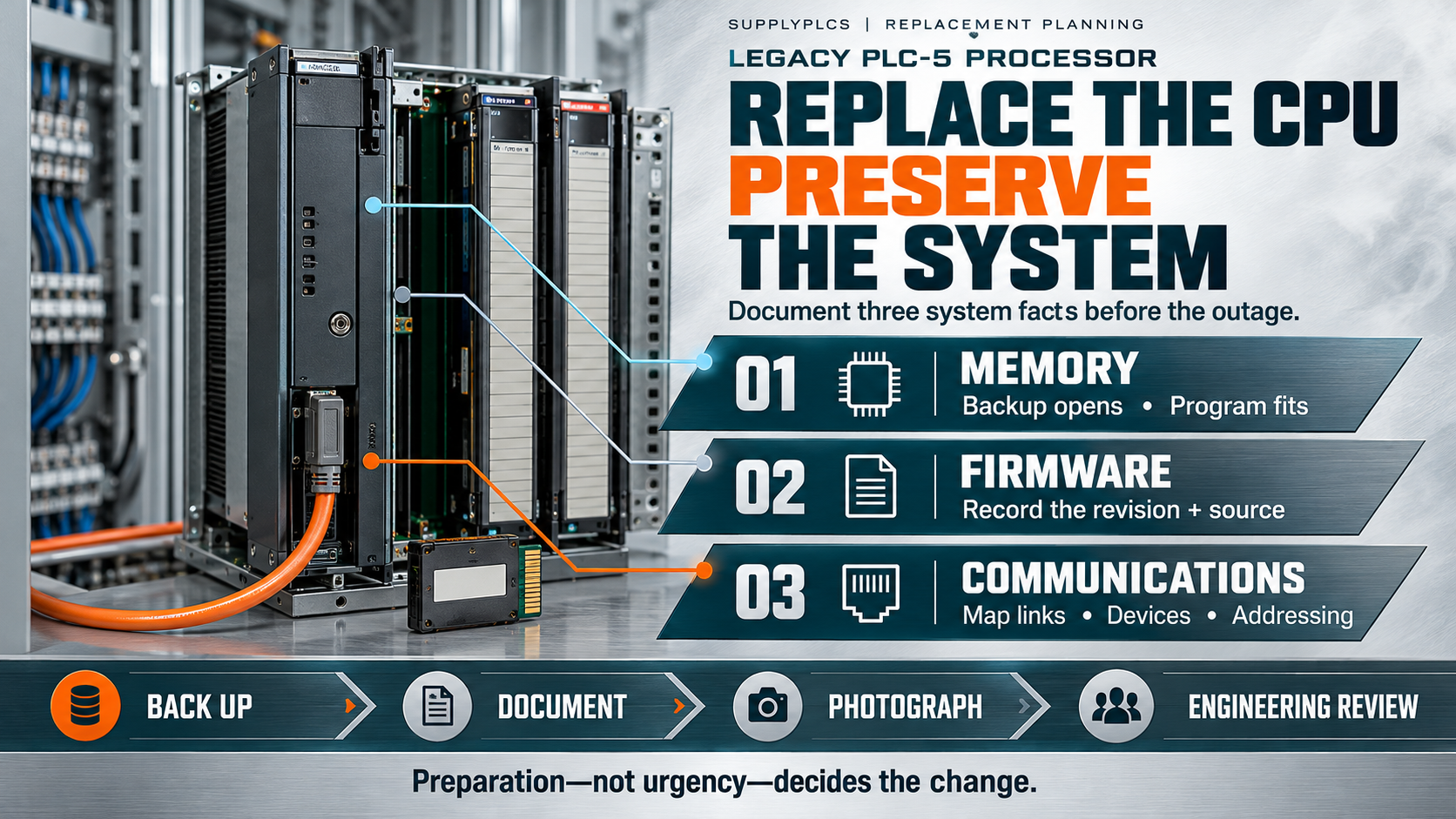
When a PLC-5 processor has to be changed on a live system, the part number is the easiest part of the job to settle. The harder questions concern memory, firmware, and communications, because those are the conditions that decide whether the change behaves as expected. An Allen-Bradley PLC-5 CPU replacement should begin with a survey of those three areas, not with an order.
An Allen-Bradley PLC-5 CPU replacement is rarely urgent enough to justify skipping preparation. The processor holds the program, the memory configuration, and the communication settings that the machine depends on, and each of those must be documented before anything is disturbed. This article sets out what to check.
Why Memory, Firmware and Communications Define the Task
Three conditions shape an Allen-Bradley PLC-5 CPU replacement: the memory fitted and used, the firmware revision in the processor, and the communication arrangements around it. Each is a recorded fact about the machine, and each should be captured before an order is placed.
An Allen-Bradley PLC-5 CPU replacement that ignores memory risks a processor that cannot hold the program. One that ignores firmware risks a unit that does not match its environment. One that ignores communications risks a processor that will not talk to the devices around it. Together, those three areas define the task.
None of these conditions should be guessed. An Allen-Bradley PLC-5 CPU replacement should be based on documentation read from the system, not on a recollection of how a similar machine was once configured. It helps to think of these three areas as the questions a supplier will ask: memory, firmware, and communications are exactly the facts that determine whether a processor suits a job, so collecting them is not busywork but the substance of the request.
Memory and Program Documentation
Begin with the program itself. Confirm that a current, openable copy of the PLC-5 program exists somewhere other than the processor, and note the memory size the program requires. An Allen-Bradley PLC-5 CPU replacement should preserve both the logic and the conditions under which it runs.

Record the memory details associated with the installed processor, and confirm them against the documentation rather than from memory. An Allen-Bradley PLC-5 CPU replacement enquiry that states the memory requirement precisely is far easier to answer than one that leaves it vague. Photograph the labels and the surrounding hardware as supporting evidence. Note the memory details and the program size, and keep them beside the program copy rather than in a separate file. When the two travel together, a reader can see immediately whether the program fits the memory available, which is one of the first questions any review will raise.
Establish who owns the program documentation and where it is stored. An Allen-Bradley PLC-5 CPU replacement depends on access to that documentation, and access should be confirmed during preparation rather than discovered during the work. Confirm also that the copy of the program can actually be opened and read with the tools on hand. A file that exists but cannot be opened is of little use when the window arrives, so the check should happen while there is still time to resolve it.
Firmware and Revision Records
The firmware revision is the next fact to establish. Read what can be read from the processor and record it alongside the source of that information. An Allen-Bradley PLC-5 CPU replacement should carry the revision as a documented value, even when the value is uncertain and marked as such.
Do not decide compatibility from resemblance. Whether a particular processor and revision can serve in a given system is a question for official documentation and qualified engineering judgement. An Allen-Bradley PLC-5 CPU replacement should route that question to the correct source rather than settle it on the shop floor.
Keep the revision record with the rest of the survey. The plan is easier to build when the memory, firmware, and communication facts sit in one place. Where a record is missing, note the gap explicitly. Record where each revision value came from — read from the unit, taken from a drawing, or reported by an operator — so that its reliability is visible. A value with a known source can be trusted appropriately; a value with no source should be treated as provisional until it is checked.
Communications and I/O Conditions
Communications deserve their own survey. Record the networks and links the processor uses, the devices it exchanges data with, and the addressing in use. An Allen-Bradley PLC-5 CPU replacement should describe the whole conversation the processor takes part in, not only its physical connections.
Note the interfaces, the cabling, and the surrounding I/O conditions, and photograph the arrangement before anything is unplugged. An Allen-Bradley PLC-5 CPU replacement planned from a clear communications record is far less likely to stall during commissioning. Note any redundancy or backup paths, and record how they are configured. A change that preserves the primary path but not a secondary one may leave the machine less resilient than it was, and that difference belongs in the record.
Record what is not documented as well — added links, field modifications, or workarounds accumulated over the years. An Allen-Bradley PLC-5 CPU replacement that overlooks them may fail to reproduce the machine's existing behaviour. Where a link runs to equipment outside the immediate cabinet, note the far end as well as the near end. Recording only the processor's side of a connection leaves half the picture missing, and it is the half that often explains why a change did not behave as expected.
Anonymous Scenario Example
Consider an illustrative case. Illustrative anonymous scenario, not a Supplyplcs customer project.
In June 2024, a maintenance team in Jakarta, Indonesia, planned a processor change during a short maintenance window. Using this Allen-Bradley PLC-5 CPU replacement approach, the team confirmed a current program backup, recorded the memory requirement, and noted the firmware revision together with its source. They surveyed the communication links and the connected devices, and photographed the terminations before the window opened. The Allen-Bradley PLC-5 CPU replacement request listed the memory, firmware, and communications facts together, and flagged the one record that could not be found. Because the preparation was complete, the work fitted into the available window as planned.
Planning the Maintenance Window
A processor change on a live system usually has to fit inside a limited window, and the plan should be built to fit it. List every step in the order it must happen: confirming the backup, reading the memory and firmware, surveying the communications, and only then disturbing the hardware. A written sequence turns an intimidating task into a series of small, checkable steps.
Allow for the unpredictable. Even a well-prepared change can meet a surprise — a record that does not match, a cable that is not where the drawing says it is — and the plan should leave room to deal with one. Building slack into the window is not pessimism; it is what keeps a short outage short.
Agree the point of no return and the fallback. Decide in advance what will happen if a check fails, and who will make that call. A window that ends with the machine running is the goal, and a clear plan gives the team the best chance of reaching it.
Brief everyone who will be present. A short pre-window conversation that walks through the sequence, the responsibilities, and the fallback point costs little and prevents much confusion. People who know what to expect work faster and safer than people who are learning the plan as the work unfolds.
Keep a copy of the plan with the checklist so the two travel together. When the work is reviewed afterwards, the plan shows what was intended and the checklist shows what was verified, and together they explain the outcome. That combination is worth more than either document alone, and it costs nothing to keep.
Checklist for a Maintenance Window
Before the window opens, confirm each of the following:
- A current, openable copy of the program, stored off the processor.
- The memory requirement and the memory details of the installed unit.
- The owner of the program documentation and its storage location.
- The firmware revision, with its source recorded.
- The network links and interfaces the processor uses.
- The devices the processor exchanges data with, and the addressing in use.
- Photographs of the terminations and the surrounding hardware.
- Any field modifications or added links not shown in the drawings.
- The official documentation relevant to the units involved.
- A list of open questions to resolve before ordering.
- A named engineer responsible for each check.
- A record of what is confirmed and what remains provisional.
The checklist does not promise that a change will succeed, and it does not settle compatibility. It ensures the work rests on facts.
For reference, the processor family discussed here is listed by Supplyplcs under Allen-Bradley PLC-5 spare parts, with related items in the wider Rockwell Allen-Bradley category. Those pages list items; they do not replace the documentation checks described above.
Procurement Notes for Buyers and Engineers
Procurement should receive the same evidence engineering has gathered. For an Allen-Bradley PLC-5 CPU replacement request, that means the processor reference, the memory requirement, the firmware revision and its source, and a summary of the communications survey, together with photographs. A request assembled this way can be answered precisely. Attach the checklist to the request so that the supplier sees the reasoning behind the references; a request that explains how the facts were gathered is easier to answer accurately than one that presents conclusions without their basis.
Supplyplcs is an industrial automation spare parts supplier. A practical next step is to submit the complete model, along with clear photographs of the nameplate and the surrounding installation, for a quotation. Providing the full reference and images helps the enquiry reach the correct item and reduces the back-and-forth an incomplete request always creates.
No replacement should be treated as confirmed until the documentation and a qualified engineering review support it. An Allen-Bradley PLC-5 CPU replacement proposal that rests on assumptions about memory, firmware, or communications is not ready to approve.
It is worth treating the written record as part of the method rather than an afterthought. File the identifiers, the photographs, the drawings, and the manual references in one dated pack, and list every point that the documents do not settle. An honest note about a gap is more useful than a confident assumption, because it lets the next person check the same evidence against the same sources.
Conclusion
An Allen-Bradley PLC-5 CPU replacement is decided by records rather than by urgency. Verify the program backup, establish the memory requirement, record the firmware revision with its source, and survey the communications before anything is disturbed. An Allen-Bradley PLC-5 CPU replacement prepared that way fits its window; one attempted without preparation rarely does.
Keep the evidence in one place that both engineering and procurement can reach, and route every compatibility question through official sources. An Allen-Bradley PLC-5 CPU replacement handled with that discipline protects the machine and the records alike. The preparation, not the part, is what most often decides whether a processor change succeeds.
Table of Contents
- Why Memory, Firmware and Communications Define the Task
- Memory and Program Documentation
- Firmware and Revision Records
- Communications and I/O Conditions
- Anonymous Scenario Example
- Planning the Maintenance Window
- Checklist for a Maintenance Window
- Procurement Notes for Buyers and Engineers
- Conclusion